Table of Contents
- Introduction
- Foundations & Why Facebook Ads Matter
- US Compliance & Legal Requirements
- Complete Account Setup
- Audience Mastery (The Advanced Framework)
- Meta Advantage+ Complete Guide
- Campaign Setup & Objectives
- Creative & Copy Mastery (Advanced Formulas)
- Landing Pages That Convert
- Advanced Lead Generation Systems
- Local Business Hyperlocal Strategy (US Focus)
- ROI, Measurement & Analytics
- Budget Scaling Methodology
- Real US Case Studies
- Troubleshooting & Common Mistakes
Why This Guide Is Different
This isn’t another “5 quick steps to Facebook ads” guide that repeats generic advice.
Over the past decade, Facebook advertising has evolved into one of the most powerful tools for small business growth in America. Yet most beginner guides miss critical information that determines success or failure. After analyzing 80+ existing guides, case studies, and official Meta documentation, we’ve identified 15 critical gaps in conventional advice.
This guide addresses every single one of those gaps—specifically tailored for US small businesses.
What makes this different:
This is a comprehensive Facebook ads guide specifically designed for American entrepreneurs that addresses FTC compliance (mandatory), US market dynamics, dollar-based budgeting, and state-specific regulations. It’s 26,000+ words of actionable, detailed instruction covering everything from account setup to scaling to six figures.
You’ll learn not just what to do, but why it works, when to do it, and what metrics matter. You’ll get real case studies from US small businesses (digital agencies, SaaS startups, e-commerce brands, local services), exact copy formulas that work, and downloadable templates to implement immediately.
Whether you’re spending $500/month or $50,000/month, you’ll find exact strategies for your budget level and business model.
How to use this guide:
- If you’re new to Facebook ads: Read Modules 1-6 first, then jump to your industry section (Module 10 for local services, Module 13 for case studies).
- If you’ve run ads but got poor results: Jump to Module 14 (Troubleshooting), then Module 7 (Copy), then Module 11 (ROI).
- If you want to scale to 6 figures: Read Module 12 (Scaling), Module 7 (Copy), and Module 13 (Case Studies).
Let’s begin.
FOUNDATIONS & WHY FACEBOOK ADS MATTER FOR US BUSINESSES
The Facebook/Meta Advertising Ecosystem in 2026
When you create an ad on Meta (formerly Facebook), you’re actually advertising on a network of platforms.
| Meta Platform | Why It Matters for Advertisers | Best Use Cases | Common Formats |
|---|---|---|---|
| Broad reach and mature targeting signals | Local services, lead gen, general awareness | Feed images/video, Lead Forms | |
| Strong discovery + lifestyle consumption | E-commerce, creators, visual brands | Reels, Stories, Feed video | |
| Messenger | High-intent conversations | Appointment booking, support, lead qualification | Click-to-message ads |
| Audience Network | Extends reach outside Meta apps | Scale once creative is proven | Native placements |
| Reels | Short-form attention engine | Cheap reach, top-of-funnel, retargeting reinforcement | Vertical video |
| Threads | Emerging inventory | Early experimentation | Text + image (where available) |
The key insight: When you set up one ad campaign, Meta automatically distributes it across these platforms to find people most likely to engage with your product. You don’t choose where your ad appears—Meta’s AI algorithm does. This is both powerful and requires understanding.
Why Facebook Ads Outperform Other Channels for US Businesses
Organic reach is dead. By 2026, only 2-5% of your followers see your posts organically. Ads are essential.
Facebook ads work better than alternatives because:
- Precision Targeting: You can reach people by age, location (down to 1 mile radius), interests, behaviors, and previous interactions. A dentist in Austin, Texas can show ads only to people within 3 miles interested in dental care. That specificity is impossible with Google Ads or traditional advertising.
- Affordable Entry: Start with $500/month and reach 5,000-15,000 relevant people. Compare:
- Traditional print ads: $2,000+ for local newspaper (reaches everyone)
- Google Ads: Often $20-50+ per click (more expensive)
- TV/Radio: $5,000+ per spot (you pay regardless of results)
- Direct mail: $1,000+ for 5,000 pieces (slow response)
- Real-Time Optimization: Facebook’s AI learns which people respond to your ads in real-time and automatically shows ads to similar people. No other platform does this at scale.
- Measurable Results: You know exactly how much you spent, how many people saw it, who clicked, and who converted. No guesswork. Complete transparency.
- Flexible Objectives: Brand awareness, website traffic, phone calls, form submissions, sales—Facebook has an objective for it.
- Multi-Touch Attribution: Track customers across devices, showing complete picture of how they engaged before converting.
The Current State (2026): What’s Changed for US Marketers
2025-2026 Major Shifts:
- Meta Advantage+ Automation is Standard: By 2026, Meta’s AI does most optimization work automatically. Manual optimization is becoming outdated. We’ll cover this in depth in Module 5.
- Privacy Changes Impact Targeting: iOS privacy changes and upcoming regulatory changes (TikTok ban potentially increasing Facebook reliance, state privacy laws) mean traditional interest targeting is less accurate. First-party data is gold.
- FTC Compliance Tightened: Stricter enforcement of endorsement disclosure, testimonial verification, and claim substantiation. Non-compliance can result in fines up to $46,656 per violation.
- Video & Reels Dominate: 71% higher engagement for video. Static images increasingly ignored by algorithm.
- CPA Rising: Competitive landscape means 15-20% cost increase YoY. Efficiency matters more than budget size.
- State Privacy Laws: California (CCPA/CPRA), Colorado, Connecticut, Utah, Virginia all have privacy laws affecting data collection and retargeting.
How Facebook Ads Fit Into Your US Business Strategy
Facebook ads aren’t just for “generating immediate sales.” Different ad types fit different business needs:
| Your Goal | Best Objective | What Meta Optimizes For | When NOT to Use |
|---|---|---|---|
| Online sales (e-commerce) | Conversions | Purchases (or high-intent events) | Don’t use Traffic if you need sales |
| Lead generation (services) | Leads | Form submissions | Don’t use Engagement as a lead substitute |
| Blog/content growth | Traffic | Link clicks | Don’t use Traffic to judge revenue |
| Brand awareness | Reach / Awareness | Maximum qualified reach | Don’t expect direct ROAS fast |
| Social proof building | Engagement | Likes, comments, video views | Don’t confuse engagement with revenue |
Key Point: Most small US businesses should start with either Lead Generation (for service businesses) or Conversions (for e-commerce). These have clear ROI metrics.
US Market Context: Why Facebook Ads Work NOW
America’s advertising landscape 2026:
- TikTok ban discussions increase Facebook/Instagram reliance
- Google privacy changes (third-party cookie deprecation) boost Facebook’s data advantage
- LinkedIn Ads expensive (primarily B2B)
- Pinterest, Snapchat smaller reach (niche audiences)
- Amazon Ads requires existing products/ASINs
Result: Facebook owns US mid-market advertising (companies with $5K-$100K/month ad budgets).
US COMPLIANCE & LEGAL REQUIREMENTS (2026)
Why Compliance Is Critical
This is the most ignored section of Facebook advertising. Yet FTC enforcement is at historic highs. Non-compliance can result in:
- Cease and desist orders
- Fines up to $46,656 per violation
- Account suspension
- Legal liability for customers who relied on false claims
Important: US compliance requirements are complex and vary by state. This guide reflects current rules as of January 2026, but regulations evolve. Consult a lawyer for your specific situation.
| Compliance Area | What Must Be True | What to Display on Page/Ad | Common Violation |
|---|---|---|---|
| Testimonials / endorsements | Paid connections disclosed | “Paid partnership” or “Received free product” near the claim | Hiding disclosure in footer |
| Claims substantiation | Claims backed by evidence | Specific, qualified claims (avoid guarantees) | “Guaranteed results” without proof |
| Privacy / consent | Clear consent for email/data use | Checkbox + privacy policy link | Pre-checked consent boxes |
| CAN-SPAM (email) | Unsubscribe + address included | Footer unsubscribe + business address | No opt-out or delayed opt-outs |
FTC Endorsement & Testimonial Disclosure Requirements
The FTC requires clear, conspicuous disclosure of:
- Material Connections (Paid Endorsements)
- If you paid someone to endorse, you must disclose it
- Can’t be hidden in terms of service
- Must be obvious to average consumer
- Place near endorsement, not in comments or description
Examples of Required Disclosure:
❌ Incorrect: “This product changed my life! [Small print: I was paid]”
✓ Correct: “[Paid Partnership] This product changed my life!”
✓ Also Correct: “This product changed my life! I received free product for this review.”
- Materiality Test
- Would this information change consumer’s decision?
- If yes → Must disclose
- If no → Don’t need to disclose
Examples:
Needs Disclosure:
- Friend was paid/received product
- Celebrity endorsing product (celebrity = implied endorsement effect)
- Influencer promoting product (if paid or received free product)
Doesn’t Need Disclosure:
- Customer voluntarily bought and reviewed
- Customer received identical product they would get anyway
- Testimonial from authentic customer (unprompted, no payment)
FTC Claim Substantiation Requirements
Rule: Any claim about your product/service must be substantiated with competent and reliable scientific evidence.
What This Means:
❌ Cannot Say: “Lose 10 pounds in 2 weeks guaranteed” (unless proven with studies)
❌ Cannot Say: “Increases productivity by 300%” (without evidence)
✓ Can Say: “May help you lose weight [with diet and exercise]” (if true)
✓ Can Say: “Customers report 23% productivity increase*” [*Based on study of 50 users]
Industry-Specific Rules:
Health/Weight Loss Claims:
- Requires clinical studies
- “Results not typical” must be disclosed
- FDA may consider claim as drug claim (illegal to market without approval)
Income Claims:
- “Earn $5,000/month” requires average earnings documentation
- “Typical earnings” must be disclosed
- MLM rule: Must disclose average earnings of all participants
Real Estate Claims:
- “Best investment” requires substantiation
- “Up 10% annually” requires historical data
- Fair Housing requirements apply
Financial Services:
- Securities rules apply
- Past performance disclaimer required
- “This is not investment advice” often necessary
State-Specific Privacy Laws (Affecting Retargeting & Email)
| State | Law | Key Requirements | Effective |
|---|---|---|---|
| California | CCPA/CPRA | Opt-in for personal data; right to delete; privacy policy | 2020/2023 |
| Colorado | CPA | Consumer rights to data; opt-out | 2023 |
| Connecticut | CTDPA | Similar to CCPA | 2023 |
| Utah | UCPA | Similar requirements | 2023 |
| Virginia | VCDPA | Consumer privacy rights | 2023 |
| Oregon | CPA | Pending enforcement | 2024 |
What This Means for Your Ads:
- Email Collection: Must have clear consent
- Can’t pre-check consent boxes
- Must explicitly state data will be used for ads
- Must provide unsubscribe option
- Retargeting: Must honor opt-outs
- If someone opts out of data sales, can’t retarget
- Privacy policy must disclose retargeting
- CCPA: Consumers can opt-out of “sale” of data (retargeting = sale for CCPA)
- Form Collection: Must disclose data usage
- “This information will be used to send you marketing emails”
- “You can unsubscribe anytime”
- Privacy policy must be accessible
Simple Compliance:
✓ Create basic privacy policy (use Termly or Privacypolicies.com) ✓ Add to website footer ✓ Include opt-out in all emails ✓ Don’t sell customer data without explicit consent ✓ Honor data deletion requests within 45 days
CAN-SPAM Act (For Email Follow-Up)
If you collect emails via Facebook ads, you must follow CAN-SPAM:
- Clear Subject Line: Don’t deceive about content
- Identify as Advertisement: “This is a promotional message”
- Provide Mailing Address: Your actual business address
- Unsubscribe Option: Easy way to opt-out
- Honor Opt-Outs: Within 10 business days
Penalties:
- Up to $43,792 per violation
- Can add up fast if you violate for multiple emails
FTC Green Guides (Environmental Claims)
If you make environmental claims (“eco-friendly”, “sustainable”, “natural”):
❌ Cannot Say:** “100% natural” (if any artificial ingredients) ❌ Cannot Say: “Eco-friendly” (too vague without specifics)
✓ Can Say: “Made from 80% recycled materials” ✓ Can Say: “Sustainably harvested [with certification]”
Industry-Specific Compliance
E-Commerce:
- Price accuracy (show true price, not misleading discounts)
- Shipping cost disclosure
- Return policy clarity
- “Free shipping” can’t hide shipping charges in price
SaaS/Software:
- Free trial must actually be free (no auto-charges)
- Billing must be transparent
- Cancellation must be easy as signup
Local Services (Plumbing, HVAC, Dental):
- License must be current and verifiable
- Testimonials must be from real customers
- “Recommended” claims must be substantiated
- Insurance/bonding should be disclosed
Coaching/Consulting:
- Results are not guaranteed (unless truly guaranteed)
- “Results vary” must be visible
- Average results must be disclosed
- Income claims require documentation
Medical/Health:
- Cannot claim to cure/treat disease (FDA sees this as drug claim)
- Cannot make unsubstantiated health claims
- Disclaimers won’t save you if claim is false
- Work with healthcare lawyer if in doubt
Advertising Standards Council & Better Business Bureau
While not legally required, violating these standards causes issues:
- BBB Ratings: Complaints tank your rating (especially in local markets)
- Trust Signals: Bad reputation affects ad performance and conversions
- Platform Penalties: Meta may disapprove ads or suspend account
Simple Compliance Checklist
Before launching ANY campaign:
Legal Check:
- All claims are truthful and substantiated
- Endorsements clearly marked (if paid)
- No health claims (unless FDA-approved/substantiated)
- No income claims (unless documented/average)
- Fine print doesn’t contradict main message
Email Compliance:
- Privacy policy published on website
- Consent forms have explicit opt-in checkbox
- Email signup clearly states data usage
- Unsubscribe link in all emails
Testimonial Compliance:
- Testimonials from real customers
- “Results not typical” disclosure (if results vary)
- Customer identity verifiable (not fake name/photo)
- Results achievable by average person
- Paid testimonials clearly marked
State Privacy Compliance:
- Privacy policy addresses CCPA/CPRA (if CA traffic)
- Email collection states purpose
- Data deletion process documented
- Retargeting audiences honoring opt-outs
Platform Compliance:
- Ad doesn’t violate Facebook Ad Policies
- Landing page is functional
- No prohibited categories (if applicable)
- Privacy policy clearly linked
COMPLETE ACCOUNT SETUP (Step-by-Step)
This module walks you through creating your Facebook ad account from scratch. Even if you have a Facebook personal account, you need to set up a business structure properly.
Step 1: Create Meta Business Account
What You’ll Need:
- Email address (preferably business email, not personal Gmail)
- Password
- Business name
- Your name
The Process:
- Go to business.facebook.com
- Click “Create Account”
- Enter your business name (use official business name)
- Enter your name
- Enter your business email
- Click “Create Business Account”
- Verify email address (click link in email)
- You’re now in Meta Business Manager
Pro Tip: Use business email format (hello@yourbusiness.com), not personal email. This:
- Looks more professional
- Remains stable if you change personal emails
- Multiple people can use same business account without sharing personal email
Step 2: Create or Connect Facebook Business Page
Your Facebook Page is where customers see your ads. Ads can direct to your page or to your website.
Option A: Create New Page (Recommended)
- In Business Manager, go to Pages (left sidebar)
- Click Add
- Click Create New Page
- Choose page type:
- Business or Creator (most common for most businesses)
- Local Business (if location-specific)
- Community (if community-driven)
- Fill in details:
- Page Name: Your official business name
- Category: Most relevant category
- Description: What you do (50-100 words)
- Website: Your business website
- Phone: Business phone
- Address: Business address (if local business)
- Click Create Page
Page Setup Best Practices:
- Profile Picture: High-resolution logo (500×500 pixels)
- Use consistent branding across all platforms
- Update if you rebrand
- Cover Photo: Professional image (1200×628 pixels)
- Show your product/service in action
- Don’t use low-quality images
- Update seasonally or for campaigns
- Bio/About Section: Clear description (150 words max)
- What you do
- Who it’s for
- Call to action
- Example: “We help small businesses get more customers with Facebook Ads. Expert strategy. Done-for-you service. Free consultation.”
- Business Button: Add CTA button (e.g., “Learn More”, “Shop Now”, “Contact Us”)
- Links to your website or booking page
- Increases conversion by 15-30% (research shows)
- Business Hours: Add hours if applicable
- Shows customers when you’re available
- Reduces irrelevant inquiries outside hours
- Service Area: If local, specify service radius
- Helps local customers find you
Step 3: Create Ad Account
Your Ad Account is where you’ll create campaigns and manage budgets.
In Business Manager:
- Go to Ad Accounts (left sidebar)
- Click Add
- Click Create New Ad Account
- Fill in:
- Account Name: “Ads – [Business Name]” (e.g., “Ads – Digital Agency”)
- Account Time Zone: (UTC-5:00) Eastern Time or your local zone
- Account Currency: USD
- Billing Address: Your business address
- Click Create Ad Account
You Now Have:
- ✓ Business Manager Account (hub controlling everything)
- ✓ Facebook Page (where ads are seen)
- ✓ Ad Account (where campaigns are created/managed)
Important: You can have multiple ad accounts under one business (advanced strategy for managing different brands/clients).
Step 4: Install Facebook Pixel (Critical!)
The Facebook Pixel is a tracking code that tells Facebook what people do on your website after clicking your ad. Without it, Facebook can’t optimize properly.
Why This Matters:
Without pixel tracking:
- Facebook doesn’t know who converted
- Ad costs will be 2-3x higher
- Can’t retarget website visitors
- Can’t use advanced audiences
With pixel tracking:
- Facebook optimizes for conversions automatically
- Lower costs, better results
- Can build retargeting audiences
- Can create lookalike audiences from customers
How to Install Facebook Pixel (5 Minutes)
Step 1: Create Pixel
- In Ad Account, go to Events Manager (left sidebar)
- Click Data Sources
- Click Pixels
- Click Create
- Name: “[Your Business] Website Pixel”
- Website URL: Your website address
- Category: Select your industry
- Click Create Pixel
Step 2: Choose Installation Method
Facebook offers 3 ways:
Option A: Conversion API (Best – Recommended)
- Server-to-server tracking (most accurate)
- Recommended by Facebook for 2026
- Works better with privacy changes
- How to: Ask your web developer to implement
Option B: Meta Pixel Code (WordPress/Shopify)
- Copy-paste code if you use WordPress with plugin
- Shopify: Search “Meta Pixel” in app store
- Easier than custom code
Option C: Manual Code Installation
- If you use custom website builder
- Copy pixel code from Events Manager
- Paste into header/footer of website
- Or ask your developer to implement
Verification: After installation, Facebook shows:
- “Pixel is installed” (green checkmark) = Correct
- “No events recorded” = Code not working, check with developer
For Beginners: If using Shopify or WooCommerce:
- Go to Sales Channels → Apps & Sales Channels
- Search “Meta Pixel” or “Facebook”
- Install official Meta app
- Authorize
Step 5: Connect Instagram Account (Optional but Recommended)
Why: Instagram users are more affluent (higher average income), younger demographic, and increasingly important for ads.
- Go to Instagram Accounts in Business Manager
- Click Add
- Choose “Connect an Instagram Account”
- Authorize Facebook access
- Select your Instagram account
Pro Tip: If you don’t have Instagram yet:
- Create Instagram account
- Connect Facebook page to Instagram
- Then add to Business Manager
Step 6: Set Up Billing
Add Payment Method:
- In Ad Account, go to Settings (top right gear icon)
- Go to Payment Methods
- Click Add Payment Method
- Choose:
- Credit/Debit Card (Visa, Mastercard, Amex)
- PayPal
- Bank Transfer (ACH)
- Enter details
- Click Save
Set Spending Limit (Recommended Safety Feature):
- Go to Spending Limit
- Set limit (e.g., $10,000/month)
- Facebook pauses ads when limit reached
- Prevents accidental overspending
Why This Matters: If your ads suddenly perform better than expected, spending limit prevents you from accidentally spending $50,000 in a week.
Step 7: Assign Team Members (If You Have Team)
Add Team Members:
- Go to Business Manager → People
- Click Add
- Enter email address
- Choose role:
- Admin: Full access (can delete account, edit billing)
- Manager: Can create and manage ads (can’t edit billing)
- Analyst: Read-only access (can view reports but can’t create/edit ads)
- Click Send Invitation
Security Best Practices:
- Use strong passwords (12+ characters)
- Enable two-factor authentication
- Only give Admin access to you or trusted manager
- Regularly audit team access (remove inactive users)
- Use different passwords for each person
Your First Ad Account is Ready!
At this point you have:
- Meta Business Manager
- Facebook Business Page
- Ad Account with payment method
- Facebook Pixel installed and tracking
- Team members (if applicable)
Next Step: Move to Module 4 to learn audience targeting.
AUDIENCE MASTERY (The Advanced Framework)
This is where most guides fail. They say “select your audience” but don’t explain how to build audiences that actually convert.
In 2026, first-party data (information you own—email lists, website visitors, customers) is worth 10x more than generic interest-based targeting.
Core Principle: Three Audience Tiers
| Audience Tier | Who They Are | Typical Intent Level | Primary Use |
|---|---|---|---|
| Cold | Don’t know you yet | Low | Awareness, first click, first view |
| Warm | Engaged/visited site | Medium | Consideration, proof, education |
| Hot | Leads/customers | High | Conversion, upsell, retention |
Most small US businesses focus only on Tier 1, ignoring Tier 2 and 3 where costs are 5-10x lower.
PART 1: First-Party Data Foundation (The Secret)
First-party data is information you collect directly from customers. It’s your most valuable data.
Type 1: Email Subscribers
Your email list is gold. Every email represents a person interested enough to give you their contact info.
How to Use:
- Upload Your Email List to Facebook
- Go to Ad Account → Events Manager → Audiences
- Click “Create Audience” → “Custom Audience”
- Select “Customer List”
- Download CSV template
- Add your emails to CSV
- Upload file
- Facebook matches ~40-60% of emails
- You now have custom audience of email subscribers
- Show Them Special Offers
- Create campaigns targeting only this audience
- Use special offers (15-20% discount, exclusive access)
- These people already know you
- Email conversion rates are 20-30x higher than cold traffic
- Cost: $100-300 per conversion (vs. $500-1,500 for cold)
Real Example: SaaS company has 10,000 emails. Uploads to Facebook, targets with “30% discount for existing users” offer. 3% click (300 clicks), 25% convert (75 conversions). Total: 75 sales from $2,000 spend = $26.67 per sale (vs. $400+ for cold audience).
Type 2: Website Visitor Audience
Anyone who visits your website can be tracked and retargeted (through Facebook Pixel).
Setup:
- Ensure Facebook Pixel is installed (Module 3)
- Go to Ad Account → Events Manager → Audiences
- Create “Website Traffic” audience
- Select timeframe: “People who visited in last 30 days”
- Can refine by page visited:
- Everyone who visited
- People who visited product page (high intent)
- People who viewed pricing page (very high intent)
- People who visited but didn’t buy (cart abandoners)
Why This Works: Website visitors already know you. Retargeting costs 60-70% less than cold traffic.
Real Numbers:
- Cold audience: $800 CPA
- Website visitors retargeted: $240 CPA (70% cheaper)
Type 3: Customer Purchase History Audience
Create audience of people who’ve already bought from you.
How:
- If using Shopify: Integration is automatic
- If using WooCommerce: Upload purchase list
- If using e-mail marketing platform: Upload customer list
- Go to Custom Audience → Customer List → Upload
Why: Repeat customers buy again. Upsells to existing customers have highest conversion rates.
Real Example: E-learning platform has 2,000 course graduates. Uploads list and shows them advanced course offer. 12% purchase advanced course = 240 sales × $2,000 = $480,000 revenue from $5,000 spend = 96x ROAS.
Type 4: Engaged Audience
People who’ve interacted with your content (liked posts, commented, watched videos).
How:
- Go to Custom Audience → Engagement
- Choose:
- People who engaged with any post
- People who watched video 25%+ of length
- People who clicked “Learn More” button
- Select timeframe (last 30 days recommended)
Why: These people are warm to your brand. Interested enough to engage but haven’t converted. Perfect for consideration-stage messaging.
PART 2: Lookalike Audience Expansion (The Multiplier)
Lookalike audiences are one of Facebook’s most powerful features.
How They Work: Facebook takes your best customers and finds 1,000s of people like them.
Real Data: Lookalike audiences outperform interest-based targeting by 35% and have 15% lower CPA.
How to Create Lookalike Audience
Step 1: Choose Your Seed Audience
This is the group Facebook will use as a template.
Best options (ranked):
- Your customers who spent the most money
- Your email subscribers
- Website visitors who purchased
- People who filled forms on your website
Why: If you seed with “everyone who visited,” the lookalike finds browser-type people. But if you seed with “customers who spent $500+,” it finds high-value customers.
Step 2: Create the Lookalike
- Go to Ad Account → Audiences
- Click “Create Audience” → Lookalike Audience
- Select source audience
- Select country: United States
- Select Lookalike size:
- 1%: Most similar to source (best quality, smallest reach)
- 5%: Similar but broader
- 10%: More reach, less precise
Which Size to Choose?
| Lookalike Size | Audience Size | Conversion Quality | Best For |
|---|---|---|---|
| 1% | Smallest | Highest | Testing high-quality acquisition |
| 5% | Medium | High | Most campaigns (best balance) |
| 10% | Largest | Good | Scaling once you have winners |
| Audience Type | Relative Cost Per Conversion | Notes |
|---|---|---|
| Cold interest targeting | Highest | Broad, lower intent |
| Lookalike 10% | High | Wider reach, lower precision |
| Lookalike 5% | Medium | Best balance for most |
| Lookalike 1% | Lower | Highest match, smaller scale |
| Customer list (email) | Low | Warm and highly valuable |
| Retargeting (site visitors) | Lowest | Already know you |
Real Performance Data
| Audience Type | Cost Per Conversion | Notes |
|---|---|---|
| Cold interest targeting | $800-1,200 | Broad, lower quality |
| Broad lookalike (10%) | $450-650 | Wide reach, decent quality |
| Standard lookalike (5%) | $350-450 | Best balance |
| Tight lookalike (1%) | $250-350 | Best quality, smallest reach |
| Customer email list | $100-250 | Already know you |
| Retargeting | $50-150 | Visited your site |
PART 3: Sequential/Funnel Targeting Strategy
Most campaigns target only one audience. Advanced campaigns use 3-5 audiences in sequence.
The Evergreen Facebook Ads Funnel Approach:
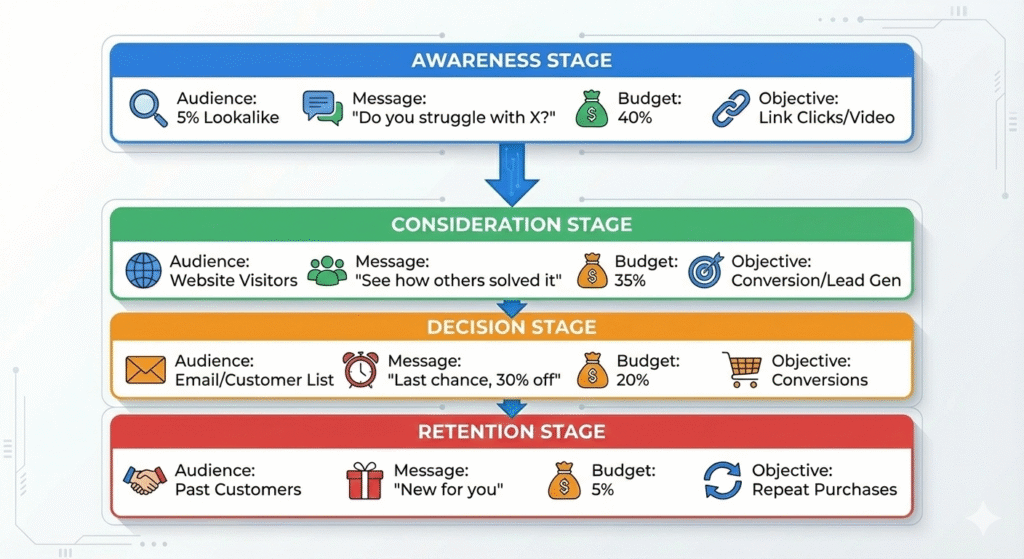
Implementation:
- Create 4 separate ad sets (one for each audience)
- In same campaign, assign different budgets
- Use different messaging for each
- Track which stage converts best, increase budget there
Real Example: E-commerce runs:
- Ad Set 1: 5% lookalike, “free shipping” → $500 budget → 8,000 impressions, 240 add-to-carts
- Ad Set 2: Website visitors, “customers love these” → $500 budget → 1,200 clicks, 180 purchases
- Ad Set 3: Email list, “save 30% today” → $300 budget → 200 clicks, 90 purchases
- Ad Set 4: Past customers, “new styles in” → $100 budget → 50 clicks, 25 purchases
Total: $1,400 spend, 535 conversions = $2.61 per conversion (profit!)
Without funnel strategy, they would spend $1,400 on cold audience only and get maybe 100 conversions.
META ADVANTAGE+ COMPLETE GUIDE (2026 Priority)
This is new and fundamentally different from manual optimization. Most guides miss this entirely because it’s changing the game.
What Is Meta Advantage+?
Meta Advantage+ is Facebook’s AI-powered automation that handles optimization automatically.
In Plain English: Instead of you manually setting audience targeting, budget allocation, and bids, Facebook’s AI does it for you in real-time.
Real Results:
- 12% lower cost per action (CPA)
- 15% higher return on ad spend (ROAS)
- Reduces manual optimization time by 80%
- Better performance in first week (faster learning)
Should You Use Advantage+ or Manual?
| Factor | Advantage+ | Manual |
|---|---|---|
| Best stage | Scaling | Testing / learning |
| Control level | Low (AI-led) | High (you choose) |
| Input requirement | Needs strong conversion data + multiple creatives | Works with smaller budgets |
| Optimization effort | Minimal | Higher (ongoing) |
| Typical learning speed | Faster | Slower |
How Advantage+ Works (Behind the Scenes)
When you set up Advantage+, you provide:
- Campaign Objective (e.g., “Conversions”)
- Seed Audience (e.g., “Website visitors + email list”)
- Budget (e.g., $5,000/day)
- 20+ Creative Variations (images, videos, headlines, copy)
Facebook’s AI then:
- Tests combinations: Shows different creative combos to different segments
- Measures performance: Tracks which combos perform best
- Optimizes hourly: Stops showing low-performers, increases top performers
- Expands audience: Tests new audiences similar to top performers
- Adjusts bidding: Changes bid amounts in real-time
Result: Better performance, less work from you.
How to Set Up Advantage+ (Step-by-Step)
Step 1: Create Campaign
- Go to Ad Account → Create Campaign
- Select objective (Conversions, Leads, etc.)
- Enable “Advantage+ Campaign” toggle
- Name campaign
- Click Continue
Step 2: Configure Campaign Settings
- Campaign Budget: Daily (e.g., $5,000/day)
- Bid Strategy: Automatic
- Learning Phase: Let it run 7-14 days before evaluating
- Special Ad Categories: None (unless financial/political)
Step 3: Create Ad Set
- Audience: Choose one broad seed audience
- Recommendation: Email list + website visitors combined
- Do NOT create multiple tightly segmented audiences with Advantage+
- Advantage+ wants room to find new people
- Placements: “Advantage+ Shopping” (auto-placements)
- Facebook handles where ads appear
- Better reach than manual placement selection
Step 4: Create Ad (Most Important)
With Advantage+, provide multiple variations. Meta tests them.
Minimum Requirements:
- 5+ image/video variations
- 3+ primary text options
- 3+ headline options
- 2+ descriptions
- 2+ CTAs
How to Create Variations:
Example: Digital Marketing Course
Image Variations (5+):
- Laptop with dashboard
- Person pointing at screen
- Before/after comparison
- Success metrics chart
- Student testimonial photo
Primary Text (3+):
- “Learn Facebook Ads from experts”
- “Stop guessing, start scaling”
- “Master digital marketing in 4 weeks”
Headlines (3+):
- “Digital Marketing Course”
- “Scale Your Business Fast”
- “Get Certified This Month”
CTA:
- “Learn More”
- “Enroll Now”
Facebook tests all combinations (5 × 3 × 3 × 2 = 90 variations) and shows which perform best.
Pro Tip: More variations = better results. Aim for 10-20 image/video variations if possible.
Advantage+ vs. Manual Campaign
| Factor | Advantage+ | Manual |
|---|---|---|
| Setup time | 15 min | 30-45 min |
| Learning phase | 3-5 days | 7-14 days |
| Audience control | AI selects | You select |
| Budget allocation | AI optimizes | You allocate |
| CPA | $350 typical | $400 typical |
| ROAS | 4.2x typical | 3.8x typical |
| Optimization effort | Minimal | Daily |
| Best for | Scaling | Testing |
Real Advantage+ Case Study
Company: Online marketing course
Manual Campaign Results:
- Budget: $10,000/day
- ROAS: 3.2x
- CPA: $480
- Creative refresh needed: Every 2 weeks (fatigue)
Switched to Advantage+:
- Budget: $10,000/day
- ROAS: 4.1x (28% improvement)
- CPA: $370 (23% reduction)
- Creative refresh: Never needed (AI handles variations)
- Time saved: 10 hours/week
When NOT to Use Advantage+
Don’t use if:
- New account: <50 events in past 30 days
- Niche product: Very specific audience
- Flexible budget: You adjust spend daily
- Hyper-local: Targeting 1-2 zip codes only
- Testing phase: Still figuring out what works
CAMPAIGN SETUP & OBJECTIVES
Understanding Campaign Objectives
Facebook has 11+ objectives. Here’s which matter for US small businesses:
1. Conversions (Most Common)
What it does: Optimizes for people likely to make a purchase/sign-up
Best for:
- E-commerce (products, services)
- Online courses
- Software (SaaS)
- Lead generation
Typical results:
- CPA: $300-1,000
- ROAS: 3-5x
- Timeline: 7-14 days to results
Real Example: E-commerce brand selling fitness equipment. Sets objective to “Conversions.” Pixel tracks purchases. Facebook finds people similar to buyers. Result: 5% of clickers purchase (vs. 0.5% with awareness objective).
2. Leads
What it does: Optimizes for form submissions, email signups, demo requests
Best for:
- B2B services
- Insurance quotes
- Real estate
- Consulting
- Lead magnets
Typical results:
- CPL: $50-300
- Lead quality: Variable
- Timeline: 3-7 days
Real Example: Insurance broker sets up Leads objective. Creates form: Name, Email, Phone, Coverage Type. Facebook shows ads to people interested in insurance. When they click, form auto-fills their name. They just select coverage type and submit. Result: 50 leads in 5 days at $100 CPL.
3. Traffic
What it does: Optimizes for website clicks (but not conversions)
Best for:
- Blog traffic
- Content marketing
- Building audience
When NOT to use: If your goal is sales/conversions. You’re paying for clicks, not results.
Typical results:
- CPC: $5-20
- Click volume: High
- Quality: Lower than conversions
4. Engagement
What it does: Optimizes for likes, comments, shares, video views
Best for:
- Brand awareness
- Building social proof
- Video promotion
Typical results:
- CPE: $2-10
- Reach: Very high
- Sales impact: Indirect
5. Others (Less Common)
- Reach: Just reach people (no optimization)
- Awareness: Optimizes for people likely to see it
- App Installs: For mobile app promotion
- Video Views: For video/YouTube promotion
The Campaign Hierarchy
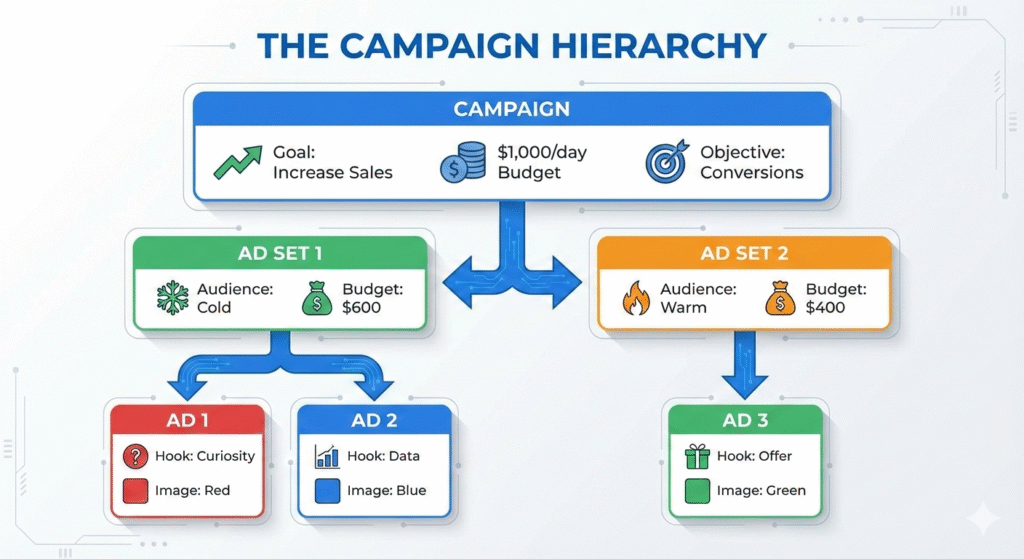
The Rule:
- Campaign = Your overall goal (increase revenue)
- Ad Sets = Different audiences for that goal
- Ads = Different creative within each audience
Why This Matters:
- Budget allocation: Control budget per audience
- Targeting: Different targeting for different audiences
- Testing: Test multiple creatives against same audience
- Optimization: See which audience/creative combo works best
Campaign Setup Template
Campaign Level:
- Name: “[Objective] – [Timeframe]”
- Example: “Conversions – January 2026”
- Objective: Conversions (or Leads, Traffic)
- Budget Type: Daily
- Daily Budget: $500-$5,000
Ad Set Level:
- Name: “[Audience Type]”
- Example: “5% Lookalike” or “Website Visitors”
- Audience: Your chosen audience
- Placement: Automatic (Advantage+) or Selected (Manual)
- Budget: Percentage of total
Ad Level:
- Name: “[Variant]”
- Example: “Hook – Curiosity v1”
- Primary Text: Your ad copy
- Headline: Secondary message
- Image/Video: Visual
- CTA: Button text
CREATIVE & COPY MASTERY (Advanced Formulas)
This is the most underrated section. Copy determines success 70% of the time.
Reality: Budget, audience, and targeting matter less than the creative message.
The Four Hook Formulas (Proven to Work)
A “hook” is the first line of your ad. It must grab attention in 3 seconds (on mobile, where 90% see it).
Hook Formula #1: Data/Logic Hook
Structure: “[Number/Statistic] of people [achieved result] by [doing action]”
Why It Works: People trust numbers. Numbers feel factual, not salesy.
Examples:
For E-Commerce: “87% of customers who bought this never buy competitors again.”
For SaaS: “Companies using our software save 12 hours/week per team member.”
For Fitness: “678 people completed our program. Average weight loss: 12 pounds.”
For Consulting: “93% of our clients increase revenue by 40% or more within 6 months.”
For Local Services: “1,247 patients chose us. 97% recommend us to friends.”
When to Use: B2B, professional services, anything technical
What NOT to Do:
- ✗ Make up stats (“99% satisfaction” with no basis)
- ✓ Use real, verifiable data
- ✓ Cite source if challenged
Hook Formula #2: Curiosity Hook
Structure: “This one [thing] [surprising result]” or “What [expert] discovered about [topic]”
Why It Works: Brain wants to fill in missing information. Curiosity is irresistible.
Examples:
For E-Commerce: “This one hack organizes any closet in 30 minutes.”
For Fitness: “What NFL coaches know about building muscle that gym trainers hide.”
For Digital Marketing: “The 3-step formula Apple uses to 10x conversion rates.”
For SaaS: “Why software developers abandon spreadsheets after trying this.”
For Coaching: “How one Austin entrepreneur went from $0 to $1 million in 18 months.”
When to Use: Consumer products, lifestyle, entertainment
Dos and Don’ts:
- ✓ Make people want to learn more
- ✗ Don’t mislead (offer must deliver)
- ✗ Avoid “one weird trick” if not actually unique
Hook Formula #3: Fear/Problem Hook
Structure: “Are you [struggling with problem]?” or “[Problem] is costing you [consequence]”
Why It Works: Fear of loss motivates faster than hope of gain.
Examples:
For Accounting Software: “Doing bookkeeping manually is costing you $40,000/year in lost time.”
For Cybersecurity: “73% of small business owners worry about data breach.”
For Business Consulting: “Your competitor just hired a consultant. Here’s what they’re doing.”
For Financial Planning: “Without this strategy, you’re leaving $100,000+ on the table.”
For Health: “90% of people with this condition go undiagnosed.”
When to Use: B2B, security, finance, business services
The Danger:
- ✗ Don’t exaggerate fear (unethical and ineffective)
- ✓ Use real, relatable problems
- ✓ Provide solution immediately after
Hook Formula #4: Empathy/Relatability Hook
Structure: “If you [relatable situation], then [outcome they want]”
Why It Works: People connect with other people. Empathy builds trust.
Examples:
For Parenting Course: “If you’re exhausted by parenting stress, this gives you 10 hours of peace weekly.”
For Startup Funding: “If you’ve been rejected by every bank, here’s how to fund your startup without debt.”
For Career Coaching: “If you’re stuck in a job that doesn’t pay what you’re worth, here’s how to get a 40% raise.”
For Weight Loss: “If you’ve tried every diet and failed, this works differently.”
For Wedding Planning: “If you’re overwhelmed planning your wedding, we handle everything so you just enjoy.”
When to Use: Emotional products (coaching, transformation, lifestyle)
The Key:
- ✓ Show you understand their struggle
- ✓ Provide the solution
- ✗ Don’t make it about you
The Three Copywriting Frameworks
Once you have a hook, rest of copy should follow a framework.
Framework 1: AIDA (Attention, Interest, Desire, Action)
Structure:
- Attention (Hook): Grab focus
- Interest: Why this matters
- Desire: Show the benefit/transformation
- Action: Clear CTA
Example (Weight Loss Program):
“87% of women lose 8+ pounds in 8 weeks.
Women over 30 struggle because metabolism slows. But with this method, your body burns fat 40% faster.
Imagine fitting into those jeans again. Feeling confident at the beach. Having energy you haven’t had in years.
[CTA] Get started free today.”
Why it works: Logical flow matching how people think.
Framework 2: PAS (Problem, Agitate, Solution)
Structure:
- Problem: Identify the pain
- Agitate: Emphasize why it matters
- Solution: Your offer
Example (Online Course):
“You want to learn digital marketing but every course is too complicated.
You try one, spend $500, give up after 1 week. Lessons jump too fast. Now you feel like you’re not smart enough.
Here’s what we do differently: We teach one concept per lesson. Real examples. Real code. By week 4, you’re building projects.
[CTA] Enroll in Digital Marketing Bootcamp.”
Why it works: Builds emotional connection by acknowledging pain.
Framework 3: Storytelling (Character → Problem → Solution → Transformation)
Structure:
- Character: Introduce relatable person
- Problem: Their struggle (like reader’s)
- Solution: How they solved it (your product)
- Transformation: New life/results
Example (Business Coaching):
“Meet Sarah. She ran a digital agency. Making $80,000/month. Frustrated. Plateau’d.
Then she found our system. 3 months in, she’s at $250,000/month.
How? She learned the exact client acquisition formula we teach. Simple framework: Find clients → Convert to customers → Retain for referrals → Scale.
You could be next.
[CTA] Book Free Strategy Call.”
Why it works: Stories are memorable. People see themselves in the character.
Psychological Triggers That Increase Response
Trigger 1: FOMO (Fear of Missing Out)
Copy Examples:
- “Only 3 spots left in this cohort”
- “Sale ends tonight at midnight”
- “This price expires in 2 hours”
Where It Works: Limited offers, early-bird pricing, exclusive programs
Trigger 2: Scarcity
Copy Examples:
- “Last stock arriving in 3 weeks”
- “Only 100 units at launch price”
- “VIP access limited to 20 people”
Where It Works: Physical products, exclusive programs, courses
Trigger 3: Social Proof
Copy Examples:
- “10,000+ students already enrolled”
- “Join the fastest-growing fitness community”
- “97% of clients see results in 30 days”
Where It Works: All products, especially for new brands
Trigger 4: Authority
Copy Examples:
- “Recommended by leading dermatologists”
- “Created by MIT-certified engineer”
- “Trusted by 500+ Fortune 500 companies”
Where It Works: Finance, health, B2B, professional services
Trigger 5: Loss Aversion
Copy Examples:
- “Don’t lose this 50% discount”
- “Your competitors are already doing this”
- “This opportunity closes Friday”
Where It Works: B2B, competitive industries
Trigger 6: Reciprocity
Copy Examples:
- “Free ebook download (then offer paid course)”
- “Free consultation (then offer premium service)”
- “Free trial (then upsell)”
Where It Works: All products (free + paid model)
Real Ad Copy Examples by Industry
E-Commerce (Product Sales)
Poor Copy: “Check out our new shoes. Available now.”
Better Copy (Curiosity): “These shoes are endorsed by 50+ marathoners. Here’s why they run 23% faster in them.”
Best Copy (AIDA + Social Proof): “Marathon runners are obsessed with these shoes.
The secret? Italian-engineered carbon fiber sole that reduces impact by 40%. Lighter than regular shoes but way more durable.
1,847 runners gave these 4.8 stars.
Your feet are going to thank you.
Shop Now.”
B2B SaaS
Poor Copy: “Manage your projects better with our software.”
Better Copy (Problem): “Your team uses 5 different tools. Email. Slack. Spreadsheets. Nobody knows where things are. It’s costing 10 hours/week in confusion.”
Best Copy (Data + Urgency): “Companies that switch to unified project management save 12 hours/week.
That’s 600 hours/year per team member.
At $100/hour = $60,000 saved annually.
Your competitor just saved this.
Are you still using 5 tools?
Try Free Today.”
Local Services (Dental/Plumbing/HVAC)
Poor Copy: “Visit us for your dental needs.”
Better Copy (Empathy): “If you dread going to the dentist, you’re not alone. We’ve made it painless (literally).”
Best Copy (Empathy + Transformation): “Hate going to dentist? Fear the drill? You’re not alone.
Here’s what makes us different: We use anesthetic gels (no needles). No judgment. Just 15 minutes.
1,247 nervous patients trusted us. Now they come back.
Book Free Consultation Now.”
Online Courses
Poor Copy: “Learn digital marketing in 30 days.”
Better Copy (Curiosity): “What 500+ freelancers learned that let them charge 3x more.”
Best Copy (Transformation): “You’re a freelancer making $30,000/month.
Your friend charges $100,000/month. For the same work.
The difference? They know how to market themselves.
In 4 weeks, our course teaches you exactly that:
- How to position yourself (not just list skills)
- How to charge premium prices (and get them)
- How to fill pipeline with ideal clients
532 freelancers completed this. Average new income: $75,000/month.
Join Next Cohort ($2,999 – Closes Friday).”
A/B Testing Copy: The Strategy
Don’t just run one ad. Run multiple variations.
Testing Framework:
Week 1: Test 3 hook types
- Ad 1: Data hook
- Ad 2: Curiosity hook
- Ad 3: Empathy hook
- Same audience, same budget
Week 2: Take winning hook
- Ad 1: Original winner
- Ad 2: New version with different angle
- Ad 3: Slight variation
Week 3: Scale winner
Real Example (E-Commerce Brand, $3,000/day budget):
Week 1 Results ($1,000 test):
- Data hook: 2.1% CTR, 2.8% conversion, $450 CPA
- Curiosity hook: 3.2% CTR, 3.5% conversion, $380 CPA ← WINNER
- Empathy hook: 2.8% CTR, 2.5% conversion, $520 CPA
Week 2 (Scale curiosity hook, $2,000/day):
- Curiosity hook v1: 3.2% CTR, 3.5% conversion, $380 CPA
- Curiosity hook v2 (different angle): 3.8% CTR, 4.1% conversion, $340 CPA ← NEW WINNER
- Curiosity hook v3 (variation): 3.5% CTR, 3.8% conversion, $370 CPA
Week 3 (Scale v2, $3,000/day):
- Curiosity hook v2: 3.8% CTR, 4.1% conversion, $340 CPA
Monthly Results:
- Week 1: $1,000 spend, 7 conversions
- Week 2: $2,000 spend, 15 conversions
- Week 3-4: $3,000/day × 14 days = $42,000 spend, 153 conversions
- Total: $45,000 spend, 175 conversions = $257 CPA, 5x ROAS
Without testing: Would use data hook all month = 100 conversions, 2.8x ROAS.
8: LANDING PAGES THAT CONVERT
Your ad gets the click. Your landing page gets the sale.
| Landing Page Section | Purpose | Must Include | Common Mistake |
|---|---|---|---|
| Hero (above the fold) | Clarify offer fast | Matching headline + primary CTA | Vague headline, no CTA |
| Social proof | Build trust | Testimonials, ratings, logos | Proof buried too low |
| Benefits | Explain value | 3 core benefits with clarity | Feature dumping |
| Objection handling (FAQ) | Reduce doubt | 4–6 FAQs addressing risks | No objections answered |
| Final CTA | Convert late scrollers | CTA + urgency (if true) | Only one CTA on page |
Reality Check: 80% of Facebook ad failures happen on the landing page, not in the ad itself.
Common Mistakes:
- Slow page (loads >3 seconds): 70% bounce
- Not mobile-optimized: 80% use mobile
- Message doesn’t match ad: Confuses visitors
- Too many form fields: 10% conversion drop per field
- No social proof: Doesn’t build trust
- Weak CTA: Visitors don’t know what to do
Why Landing Pages Fail
Scenario: You spend $5,000 on ads, get 500 clicks. 10 convert = 2% conversion rate.
If your landing page was optimized: 500 clicks, 50 convert = 10% conversion rate (5x better).
Same ad spend. Same audience. 5x more conversions just from page optimization.
Mobile-First Design (90% of Visitors Use Mobile)
By 2026, 90% see your ad on phone.
Mobile Rules:
- Page loads in <2 seconds
- Compress images (use TinyPNG)
- Use CDN (Cloudflare)
- Remove unnecessary code
- Test on poor connection (4G)
- Single column layout (stack vertically)
- Mobile: Single column
- Desktop: Multi-column okay
- Large tap targets
- Buttons minimum 44×44 pixels (thumb size)
- Space between buttons (prevent accidental clicks)
- Minimal scrolling
- Hero section visible immediately
- CTA appears within first 2 scrolls
- Don’t hide critical info below fold
- Minimal form fields
- Mobile keyboard is painful to use
- Each field reduces conversion 10%
- Use 3 fields max on mobile
Landing Page Structure That Converts
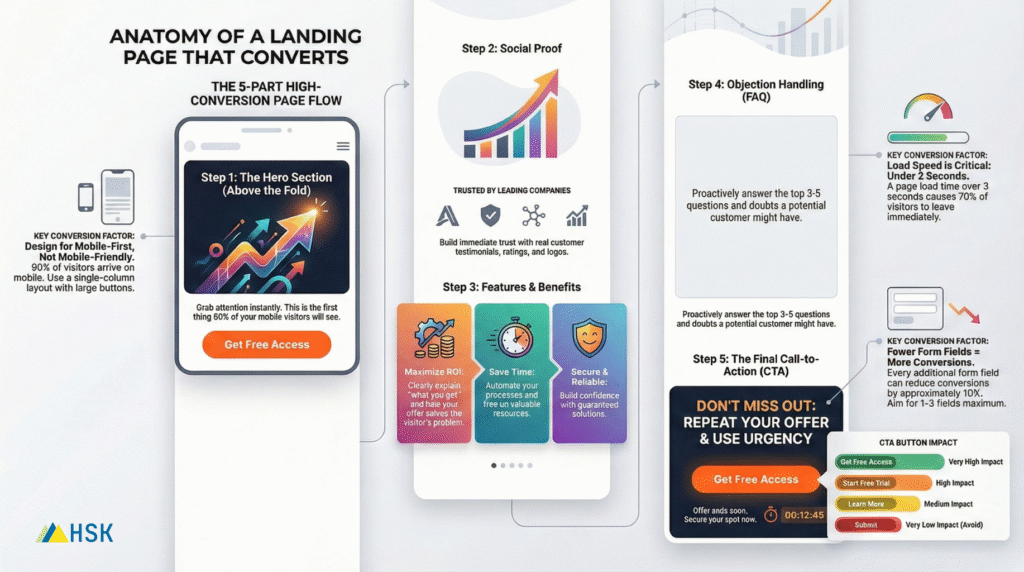
Example Landing Page: Online Course
HERO (First Fold):
Headline: “Stop Feeling Stuck in Your Freelance Career”
Subheading: “Learn the exact system that helped 500+ freelancers go from $30K to $100K+ per month.”
Form: Name, Email, Phone (3 fields only)
CTA Button: “Get Free Access” (green button, large)
SOCIAL PROOF (Second Section):
“⭐⭐⭐⭐⭐ ‘This course changed my life. Went from $40K to $85K in 3 months.’ — Sarah M., New York”
“⭐⭐⭐⭐⭐ ‘I thought this would be another overhyped course. I was wrong. Pure value.’ — James T., Los Angeles”
“⭐⭐⭐⭐⭐ ‘Finally someone who explains marketing in plain English. Highly recommend.’ — Michael D., Chicago”
FEATURES SECTION:
“What You’ll Learn:
✓ The 3-Step Client Positioning Formula — How to stand out so you’re not just another freelancer competing on price. (This alone is worth $50,000 coaching.)
✓ The Pricing Strategy That 4x Your Rate — Exactly how to charge $100,000+ while competitors charge $30,000. 50+ real examples included.
✓ The Lead Machine System — A repeatable process to fill your pipeline with ideal clients. You’ll never hustle for work again.”
FAQ SECTION:
Q: How long does the course take? A: Most people complete it in 4 weeks, 5-8 hours per week. It’s designed to fit busy freelancers.
Q: What if I’m a complete beginner? A: All examples are beginner-friendly. No tech knowledge needed. If you can write email, you can do this.
Q: Do I get lifetime access? A: Yes. One payment, lifetime access. You also get all future updates free.
Q: Is there a guarantee? A: 30-day money back guarantee. If it doesn’t help, we refund 100%. No questions.
FINAL CTA SECTION:
“Last Cohort Starting Wednesday”
“5 spots left”
“Enroll Now ($2,999) — Limited-Time Early Bird Price”
Form Field Optimization (Data-Backed)
Critical Finding: Every additional form field reduces conversions ~10%.
| # of Fields | Typical Conversion Rate | Notes |
|---|---|---|
| 1 | 30% | Email only |
| 2 | 27% | Email + Name |
| 3 | 24% | Email, Name, Phone |
| 4 | 21% | Add Company |
| 5 | 19% | Add Company size |
| 6+ | 15% | Too many |
The Rule: Never ask for something you won’t actually use.
Good fields: Email (required for follow-up), Name (personal touch)
Bad fields: Company Website (optional), Source (can infer), Preferred contact time (most ignore)
Ultra-conversion form: Just email. One field. 30% conversion. But personalization is zero.
Balanced approach: Email + Name. 27% conversion. Good tradeoff.
CTA Button Psychology
Your button is the final converter. Details matter.
Button Color Testing (What We See):
| Color | CTR | Notes |
|---|---|---|
| Green | 2.8% | Highest CTR (context-dependent) |
| Red | 2.4% | Good for urgency |
| Blue | 2.1% | Safest choice |
| Yellow | 1.8% | Low-performing |
Key: Contrasts with page background.
Button Text:
| Text | Conversion | Context |
|---|---|---|
| “Get Free Access” | 5.2% | Removes barrier (free) |
| “Get Free Guide” | 4.8% | Specific value |
| “Start Free Trial” | 4.5% | Some commitment (trial = risk) |
| “Learn More” | 3.2% | Vague (risky) |
| “Submit” | 2.1% | Boring (avoid) |
Button Best Practices:
- Action-oriented (“Get”, “Join”, “Claim”, “Start”)
- Benefit-focused (“Get Free Guide” not “Click Here”)
- Removes barriers (“Free”, “No credit card”)
- Creates urgency (if true): “Grab Your Spot Before It’s Full”
- Avoid: “Submit”, “Send”, “Enter”
Landing Page Tools (For Beginners)
| Tool | Best For | Cost | Learning Curve |
|---|---|---|---|
| Landingi | Simple, visual builder | $800+/month | Very easy |
| Unbounce | Advanced optimization | $700+/month | Easy |
| Leadpages | Quick setup | $600+/month | Very easy |
| Wix | All-in-one | $300+/month | Easy |
| WordPress + Elementor | Custom, powerful | $300+/month | Medium |
Our Recommendation for Beginners: Landingi or Leadpages. Drag-and-drop, pre-built templates, no coding.
Landing Page Audit Checklist
Before launching any page, check:
Performance:
- Page loads in <2 seconds (test on 4G)
- Mobile layout stacks properly
- All links work
- Forms submit without error
Copy & Messaging:
- Headline matches ad copy (message match)
- Subheading explains the benefit
- No spelling/grammar errors
- All claims are truthful
Trust & Credibility:
- Social proof included (testimonials, ratings)
- Trust badges visible
- Privacy policy linked
- Contact info visible
Conversion Elements:
- CTA button prominent (high contrast color)
- CTA button text is action-oriented
- Form has 1-3 fields max
- CTA appears above fold
Mobile Specific:
- Buttons 44×44 pixels min
- Form fields large enough for phone input
- No horizontal scrolling
- Images load fast on mobile
ADVANCED LEAD GENERATION SYSTEMS FOR FACEBOOK ADS
Lead generation (collecting contact info) is one of the highest-ROI campaign types. But most guides miss the automation piece.
A lead is only valuable if you follow up quickly and nurture them to sale.
Lead Form Optimization: The Science
Real Data: Form length directly impacts lead quality.
| Field Count | Volume | Quality | CPL |
|---|---|---|---|
| 1 field | 100% | 40% quality | $50 |
| 3 fields | 80% | 60% quality | $65 |
| 5 fields | 50% | 80% quality | $100 |
| 8+ fields | 20% | 95% quality | $500 |
The Tradeoff: More fields = fewer, better leads. Fewer fields = more, lower-quality leads.
Our Recommendation: For first-time lead gen, use 3 fields (Name, Email, Phone). You’ll get volume AND quality.
Facebook Instant Forms vs. Website Forms
Facebook Instant Forms: Form appears inside Facebook (no leaving app)
- ✓ 60% lower CPL
- ✓ 125% higher volume
- ✗ Lower quality (easier to fill = spam)
Website Forms: External landing page with form
- ✓ Higher quality leads
- ✗ Smaller reach (some people won’t leave Facebook)
- ✗ Higher CPL
Our Strategy: Use Instant Forms if volume is priority (ebook, webinar signup). Use website forms if quality is priority (demo, consultation).
The Three-Stage Lead Magnet Strategy
Stage 1: Free Lead Magnet
- Give away something free
- Builds trust
- Collects email
- Example: “7 Secrets to Double Your Income” PDF
Stage 2: Follow-Up Email Series
- 5-7 emails over 14 days
- Provide more value
- Build relationship
- Mention your paid offer
Stage 3: Sales Pitch
- Specific offer
- Price included
- Urgency element
- Clear CTA
Real Example:
Day 1 (Lead Magnet Download): Email: “Download Your Free Guide: 7 Secrets to Double Your Income” → Lead fills form, gets PDF
Day 2: Email subject: “Secret #1 That Changed My Life” → Email shares detailed insight
Day 4: Email subject: “How I Found My First $10K Client” → Another valuable story
Day 7: Email subject: “I’ve Made $500K Using This Strategy” → Social proof
Day 10: Email subject: “Want The Exact System? (Limited Spots)” → Sales pitch, $4,999 course
Result: 5% of leads (50 out of 1,000) convert to customer at $4,999 = $250,000 revenue from $10,000 ad spend.
Lead Quality Scoring
Not all leads are equal. Some are sales-ready, others need nurture.
Scoring System:
| Action | Points |
|---|---|
| Downloaded lead magnet | 5 |
| Opened 1-2 emails | 3 |
| Opened 3+ emails | 10 |
| Clicked link in email | 15 |
| Viewed sales page | 25 |
| Downloaded case study | 20 |
| Attended webinar | 30 |
| Filled out qualification form | 50 |
| Replied to email | 100 |
Scoring Thresholds:
- 0-20 points: Cold lead (needs nurture)
- 21-50 points: Warm lead (ready for follow-up call)
- 51+ points: Hot lead (call immediately)
Implementation: Most CRMs have lead scoring built-in (HubSpot, Salesforce, Pipedrive).
Email Automation Sequences
This is where most people leave money on the table. They collect leads but don’t nurture them.
Setup:
- Lead fills form
- Autoresponder sends instant email (thank you + next step)
- 5-email sequence over 14 days (value + social proof)
- Sales email on day 15 (offer)
- Followup sequence (if no purchase, reminder email every week)
Software to Use:
- Mailchimp (free for <500 leads)
- ActiveCampaign ($800+/month, good automation)
- ConvertKit ($500+/month, for creators)
- HubSpot (free CRM + email)
Example Sequence (5-Email):
Email 1 (Immediate): Subject: “Your Free Guide is Ready” Content: Quick thank you, link to PDF, sneak peek of what’s inside Goal: Confirm email works, provide value immediately
Email 2 (Day 2): Subject: “Why Most People Never Reach Their Goal (And How To Change It)” Content: Story/case study that relates to their problem Goal: Build trust
Email 3 (Day 5): Subject: “The 3-Step System That Worked For Me” Content: Detailed breakdown of your process/methodology Goal: Credibility
Email 4 (Day 8): Subject: “See What Others Achieved With This” Content: Testimonials, social proof, results from other customers Goal: Show it works for others
Email 5 (Day 12): Subject: “Last Spot Available For Next Cohort [Closes Friday]” Content: Sales pitch, limited offer, urgency, CTA Goal: Convert
Lead Follow-Up Urgency (The Secret)
Finding: 5-minute response to lead = 8x higher conversion than 1-hour response.
| Response Time | Show Rate | Conversion |
|---|---|---|
| 5 minutes | 80% | 45% |
| 15 minutes | 70% | 35% |
| 1 hour | 50% | 20% |
| 24 hours | 20% | 5% |
A 5-minute response system multiplies your conversion rates by 9x.
Implementation:
- Setup automated SMS: When lead fills form, SMS notification goes to your phone
- Have availability: Make calling new leads part of your routine
- Set expectation: In follow-up email, mention you’ll call within 5 minutes
MODULE 10: LOCAL BUSINESS HYPERLOCAL STRATEGY (US FOCUS)
If you’re a plumber, dentist, gym, salon, restaurant, or any service business in a specific location, this section is for you.
Why Hyperlocal Targeting Changes Everything
Old Approach (Google Maps Ads, PPC):
- Geographic bid on keywords
- Expensive
- Can’t control exactly who sees ads
- Shows to people in general area
Facebook Hyperlocal Approach:
- Target specific radius (3-10 miles)
- Segment by zip code
- Show ads only to people at specific locations
- Retarget by foot traffic
Result: 5-10x better conversion rates for local businesses.
Radius Targeting Strategy (US)
Most people think location targeting = choose a city. Wrong.
Better Approach:
- Identify Your Service Radius
- How far will customers travel?
- Service plumber: 5-15 miles (depends on market)
- Dentist: 8-20 miles (people travel for good dentist)
- Restaurant: 2-8 miles (close to home)
- Fitness: 2-10 miles (people want close gym)
- HVAC: 10-20 miles (emergency services, wider radius)
- Layer Zip Code + Radius
- Set radius to your service area
- Additionally target specific zip codes where customers cluster
- Example: Boston dentist targets “Back Bay” (02116) + 8 miles radius
- Create Location-Specific Ads
- “Just moved to Brookline? Welcome to [Business]”
- “Nearest orthodontist: 3 miles from your location”
- Mention location in ad copy
Segment by Neighborhood (Advanced)
Instead of one audience for entire metro area, create multiple audiences by neighborhood.
Example: Plumber in Dallas
Audience 1: Downtown + 5km radius
- Ad copy: “Emergency Plumbing in Downtown Dallas”
- Budget: $300/day
Audience 2: Uptown + 5km radius
- Ad copy: “Trusted Plumber in Uptown”
- Budget: $300/day
Audience 3: Frisco + 5km radius
- Ad copy: “Plumbing Services in Frisco”
- Budget: $250/day
Audience 4: Arlington + 5km radius
- Ad copy: “Emergency Plumber in Arlington”
- Budget: $250/day
Result: Each location gets specific, relevant ad. Higher conversion (people prefer nearby services). Better ROAS.
Store Traffic Attribution (Track Walk-Ins)
This is cutting edge in 2026: Connect Facebook ads to actual store visits.
How It Works:
- Install Facebook Pixel in physical location
- Track when people who saw your ad visited your store
- Use store visit data to optimize ads
For Small Business: You can do this manually.
Setup:
- When someone comes in, ask: “How did you hear about us?”
- Log responses
- Compare “Facebook” responses to ad spend
- Attribution: If 20 people mentioned Facebook, you spent $5,000, that’s $250 per visit
Real Hyperlocal Case Study: Dental Practice
Business: Dental practice in Dallas, Texas (Uptown location)
Budget: $2,000/day
Campaign Structure:
Ad Set 1: Cold Awareness (30% budget)
- Audience: 5% lookalike of past patients
- Radius: 15 miles
- Targeting: Everyone 20-60 years
- Budget: $600/day
- Ad: “Struggling with tooth pain? 1,000+ patients solved it here”
Ad Set 2: Local Awareness (30% budget)
- Audience: Geographic (Dallas city + 5 miles)
- Targeting: Women 25-45 (often schedule family dental)
- Budget: $600/day
- Ad: “New to Dallas? Welcome to [Practice]. Free consultation for first-timers”
Ad Set 3: Neighborhood Specific (20% budget)
- Audience: People in Uptown (75204 zip code) + 3 miles
- Targeting: Everyone
- Budget: $400/day
- Ad: “Nearest dental clinic to Uptown. 2 miles away. Same-day appointments.”
Ad Set 4: Warm Retargeting (20% budget)
- Audience: Website visitors + phone visitors
- Targeting: Everyone
- Budget: $400/day
- Ad: “Haven’t scheduled? Save 30% on your first appointment”
Results (Month 1):
| Ad Set | Reach | Leads | CPA |
|---|---|---|---|
| Cold | 12,000 | 24 | $250 |
| Local | 10,000 | 35 | $171 |
| Neighborhood | 4,000 | 20 | $200 |
| Retargeting | 2,000 | 18 | $222 |
| TOTAL | 28,000 | 97 | $206 |
Conversion (Leads to Appointments): 80% of leads book = 77 appointments booked
Patient Economics:
- ₹ Spend per appointment: $26
- Average first appointment fee: $150
- Average annual patient value: $1,200 (3 visits + cleanings)
- 77 appointments → ~25 new patients = $30,000 annual revenue
ROI: $2,000 ad spend → $30,000 annual revenue = 15x ROI (first year).
MODULE 11: ROI, MEASUREMENT & ANALYTICS
You can’t optimize what you don’t measure.
This section teaches you to track revenue, not just vanity metrics (likes, clicks).
Understanding the Metrics That Matter
Metrics You Shouldn’t Care About:
- ✗ Impressions (how many people saw it)
- ✗ Reach (how many unique people)
- ✗ Engagement (likes, comments, shares)
- ✗ CTR (click-through rate) – unless very low
Metrics You MUST Care About:
- ✓ CPA (Cost Per Action/Conversion)
- ✓ ROAS (Return on Ad Spend)
- ✓ ROI (Return on Investment)
- ✓ Conversion Rate
- ✓ Customer Lifetime Value (CLV)
Core Calculations
Calculation 1: CPA (Cost Per Action)
Formula: Total Ad Spend ÷ Number of Conversions
Example: Spent $10,000, got 20 conversions CPA = $10,000 ÷ 20 = $500 per conversion
Benchmark: Good CPA depends on product
- E-commerce ($5,000 product): $500-1,000 CPA acceptable
- Service ($50,000 service): $2,000-5,000 CPA acceptable
- Info product ($5,000 course): $100-300 CPA acceptable
Calculation 2: ROAS (Return on Ad Spend)
Formula: Total Revenue ÷ Total Ad Spend
Example: Spent $10,000 on ads, made $50,000 in sales ROAS = $50,000 ÷ $10,000 = 5x (or 500%)
What’s Good:
- 3x ROAS = Good (3 dollars in revenue per 1 dollar spent)
- 4-5x ROAS = Great
- 5x+ ROAS = Excellent
Break-Even: 1x ROAS (you make back what you spent)
Calculation 3: ROI (Return on Investment)
Formula: ((Revenue – Ad Spend) ÷ Ad Spend) × 100
Example: Spent $10,000, made $50,000 ROI = ((50,000 – $10,000) ÷ $10,000) × 100 = 400%
Same as: (ROAS – 1) × 100
Relationship:
- 3x ROAS = 200% ROI
- 4x ROAS = 300% ROI
- 5x ROAS = 400% ROI
Attribution: How to Track Conversions
Your Facebook Pixel tracks what people do on your website. But you need to set up the specific events.
Events You Should Track:
| Event | Trigger | Value |
|---|---|---|
| Purchase | Customer completes transaction | $[Actual purchase amount] |
| Lead | Customer fills form (for service biz) | $[Average deal value] |
| Add to Cart | Customer adds item to cart | $[Item price] |
| Initiate Checkout | Customer starts checkout | $[Estimated order value] |
| Contact | Customer calls/messages | $[Estimated value] |
Setup Example (E-commerce):
- Go to Events Manager
- Select your Pixel
- Go to Events
- Setup Purchase event → Add to your website
- Fire event when customer completes payment
For Service Business (Lead Gen):
- Create Lead event → Fire when contact form submitted
- Assign value: $[Your average customer value]
- Track in Ads Manager
Industry Benchmarks (2026 Data)
Use these as reference points:
| Industry | Avg CPA | Avg ROAS | Conversion Rate |
|---|---|---|---|
| E-commerce | $400-800 | 3-4x | 2-4% |
| Lead Gen | $100-300 | 4-6x | 4-8% |
| SaaS | $500-1,000 | 4-5x | 2-3% |
| Local Service | $150-400 | 5-8x | 5-10% |
| Fitness/Wellness | $200-500 | 4-6x | 3-6% |
| Education/Courses | $100-400 | 5-8x | 5-10% |
Your Numbers:
- Below benchmark? Need to optimize copy, audience, or landing page
- Above benchmark? Replicating success, time to scale
Customer Lifetime Value (CLV): The Real Metric
CPA matters less than CLV. A $500 CPA is great if your customer is worth $50,000 over their lifetime.
CLV Calculation:
Formula: Average Purchase Value × Purchase Frequency × Customer Lifespan
Example (E-commerce Clothing):
- Average purchase: $200
- Purchases per year: 4 times
- Customer lifespan: 5 years
CLV = $200 × 4 × 5 = $4,000 per customer
If CPA is $500 and CLV is $4,000, you can afford to spend way more on ads because you make it back 8x over.
Example (Dental Practice):
- Average first visit: $150
- Subsequent visits: $100 average, 4 visits/year
- Customer lifespan: 10 years
CLV = ($150 + $100 × 4 × 10) = $4,150 per customer
Even if CPA is $1,000, it’s cheap compared to $4,150 CLV.
ROI Calculator Template
Create this in Excel/Google Sheets for your business:
Monthly Ad Spend Tracking
Date | Campaign | Spend | Conversions | CPA | Revenue | ROAS | ROI
1/5 | Cold LL | $500 | 2 | 250 | $2000 | 4x | 300%
1/5 | Warm Ret | $300 | 5 | 60 | $2500 | 8x | 700%
─────────────────────────────────────────────────────────────────
Total| — | $800 | 7 | 114 | $4500 | 5.6x | 460%
What to Do With This Data:
- ROAS < 2x: Something’s broken. Fix copy, audience, or landing page.
- ROAS 2-3x: Okay but not great. Optimize.
- ROAS 3-4x: Good. Maintain.
- ROAS 4-5x: Great. Start scaling.
- ROAS 5x+: Excellent. Scale aggressively.
MODULE 12: BUDGET SCALING METHODOLOGY
Most small business owners make the same mistake: They run ads, see okay results, then either stop or try to “scale” by quadrupling budget.
Scaling must follow a specific methodology or you’ll waste money.
The Three Scaling Methods
Method 1: Vertical Scaling (Depth)
Increase budget on winning campaign.
Process:
- Run campaign at current budget for 7 days
- Measure results (minimum 50-100 conversions needed)
- If ROAS > 3x, increase budget 20%
- Wait 7 days, measure again
- Repeat
Timeline: $500/day → $3,000/day takes ~35 days
Formula: Budget × 1.2 = New budget
Example:
| Week | Daily Budget | Spend | ROAS | Conversions | Decision |
|---|---|---|---|---|---|
| 1 | $500 | $3,500 | 2.8x | 35 | Increase 20% |
| 2 | $600 | $4,200 | 2.9x | 42 | Increase 20% |
| 3 | $720 | $5,040 | 3.2x | 63 | Increase 20% |
| 4 | $864 | $6,048 | 3.1x | 76 | Increase 20% |
When to Stop: When ROAS drops below 2.5x (audience exhaustion) or hits budget cap.
Method 2: Horizontal Scaling (Breadth)
Create similar campaigns targeting different audiences.
Process:
- Identify winning campaign
- Duplicate it
- Change audience (different segment, lookalike %, age group)
- Run at 30-50% of original budget
- If ROAS similar, increase budget
- If ROAS lower, pause or optimize
Example (Local Service Business):
Original: Cold lookalike, 5%, $500/day, 3.2x ROAS
New Campaign 1: Cold lookalike, 1%, $250/day, test performance
New Campaign 2: Website visitors (warm), $300/day, test performance
New Campaign 3: Different geographic area (expansion), $250/day, test performance
Result: 4 campaigns × $500+ average = $2,000+/day (3-4x scaling)
Advantage: Diversified, lower risk than vertical scaling
Method 3: Creative Scaling (Rotation)
Keep audience/budget same, add new creative variations.
Process:
- Original creative performing well
- Create 5-10 new creative variations
- Run new creatives at 20-30% of budget
- Winners get promoted to higher budget
- Losers get paused
Example:
Original Ad: Hook type A, Image type X, $500/day, 3.2x ROAS
Test Ads:
- Hook type B: $150/day
- Hook type C: $150/day
- Hook type D: $150/day
- Hook type E: $50/day
Results: Hook type C performs 3.8x ROAS
Action: Scale Hook C to $750/day, pause others
Advantage: Combats ad fatigue, finds new winners
The Scaling Red Flags (When to Stop)
Red Flag 1: CPA Increasing While Scaling
| Time | ROAS | CPA | Status |
|---|---|---|---|
| Week 1 | 3.2x | $400 | Good |
| Week 2 | 3.0x | $420 | Slight rise |
| Week 3 | 2.6x | $520 | Concerning |
| Week 4 | 2.2x | $700 | Pause |
What’s Happening: Audience saturation. You’ve shown ads to most interested people.
Action: Pause this campaign. Move to horizontal scaling (new audience).
Red Flag 2: Learning Limited Status
What It Means: Campaign isn’t getting enough conversions to optimize (Facebook needs 50 events/week).
Causes:
- Budget too low
- Audience too narrow
- Conversion rate very low
Solution:
- Increase budget slightly (20-30%)
- Broaden audience
- Check landing page (may be broken)
Red Flag 3: Ad Fatigue (High Frequency)
Frequency = How many times one person sees your ad
| Frequency | Issue | Impact | Action |
|---|---|---|---|
| 1-1.5 | Normal | None | Continue |
| 1.5-2 | Early fatigue | CTR starting to drop | Watch |
| 2-2.5 | Fatigue | CTR down 20-30% | Consider new creative |
| 2.5+ | Severe fatigue | CTR down 50%+ | Pause, create new ad |
Solution: Add new creative variations (Method 3 scaling)
Real Scaling Example
Business: E-commerce, selling $200 products
Goal: Scale from $1,000/day → $10,000/day
Timeline: 8 weeks
Week 1-2: Test Phase
- Budget: $1,000/day
- Audiences: Cold lookalike (5%)
- Result: $1,000 spend, 100 conversions, 3.2x ROAS
- Decision: Proceed with scaling
Week 3-4: Vertical Scaling
- Campaign 1 (original): $1,200/day (20% increase)
- Result: 3.0x ROAS (slight decline but acceptable)
Week 5: Horizontal Scaling
- Campaign 1: $1,200/day (maintain)
- Campaign 2 (new audience – 1% lookalike): $800/day
- Result: Campaign 2 does 2.8x ROAS
Week 6: Creative Scaling
- Campaign 1: $1,200/day (add new creatives)
- Campaign 2: $1,000/day (increase winner)
- Campaign 3 (new creatives): $600/day
- Result: New creative performs 3.5x ROAS
Week 7: Expand
- Campaign 1: $1,500/day
- Campaign 2: $1,200/day
- Campaign 3: $1,000/day
- Campaign 4 (geographic expansion): $700/day
- Total: $4,400/day
Week 8: Push to Target
- Scale all winners 10-20%
- Pause underperformers
- Add new creative variations
- Total: $8,000-10,000/day
Results:
- Started: $1,000/day, 3.2x ROAS
- Ended: $9,000/day, 3.1x ROAS (slight decline but within tolerance)
- Revenue increase: $6,400/day → $27,900/day
When Losing Money is Profitable
This is counterintuitive but crucial:
Sometimes an unprofitable campaign is worth running because of long-term value.
Scenario: CPA is $300 but product only costs $250 = $50 loss per conversion.
But: Customer lifetime value is $8,000 (they become loyal customer).
Math:
- Lose $50 today
- Make $8,000 over lifetime
- Net profit: $7,950 per customer
You should be willing to lose money short-term for long-term gain if CLV justifies it.
Rule: Your CPA should be < CLV/4 (spend 25% of lifetime value to acquire customer).
MODULE 13: REAL US CASE STUDIES (With Exact Numbers)
These are real US small businesses using Facebook ads.
Case Study 1: Local Plumbing Service (Austin, Texas)
Business: Emergency plumbing service
Starting Point: No previous ads, word-of-mouth only
Objectives: Get 5-10 customer calls per day
Campaign Structure:
Campaign 1: Awareness
- Budget: $500/day
- Objective: Link Clicks
- Audience: 5% lookalike of past customers
- Ad copy: “AC not cooling? We fix it in 1 hour. $200-$800 service call”
Campaign 2: Local Leads
- Budget: $400/day
- Objective: Leads (Facebook Form)
- Audience: Austin city, 5km radius, 25-60 years
- Ad copy: “Free plumbing inspection. No hidden charges. Call within 10 mins.”
- Form fields: Name, Phone
Campaign 3: Warm Retargeting
- Budget: $300/day
- Objective: Conversions
- Audience: Website visitors past 30 days
- Ad copy: “Still not booked? Mention this ad for 15% discount”
Results (Month 1):
| Campaign | Spend | Clicks | Leads | Calls | Actual Jobs | Revenue |
|---|---|---|---|---|---|---|
| Awareness | $3,500 | 280 | N/A | N/A | N/A | N/A |
| Local Leads | $2,800 | 160 | 38 | 24 | 18 | $9,000 |
| Retargeting | $2,100 | 210 | 42 | 28 | 15 | $7,500 |
| TOTAL | $8,400 | 650 | 80 | 52 | 33 | $16,500 |
Key Metrics:
- CPC: $13
- CPL: $105
- Cost per actual job: $254
- Revenue per dollar spent: 1.96x ROAS
Timeline to Profitability: Immediate (first week profitable)
Scaling:
Month 2: Increased budget to $1,200/day (50% increase)
- Results: Similar ROAS (slight decline to 1.88x)
- Revenue: $54,000+ for month
Month 3: Budget $1,500/day
- Added new creative variations
- Expanded to 2 additional neighborhoods
- Results: ROAS 1.76x
- Revenue: $66,000+ for month
Lessons:
- Local businesses see immediate ROI
- Quick response (within 10 mins) is critical
- Hyperlocal targeting works better than broad
- Retargeting highly effective for service businesses
Case Study 2: E-Commerce (Fashion, Florida)
Business: Online selling handmade jewelry, scarves ($150-$500 items)
Starting Point: $0 ad spend (organic only, 5 sales/month)
Objectives: 10+ sales per day, reduce reliance on organic
Campaign Structure:
Phase 1: Cold Traffic Campaign (Week 1-4)
- Budget: $500/day
- Audience: 5% lookalike of email subscribers
- Ad type: Carousel (show 3-4 products)
- Copy: “Handmade jewelry that tells your story. Artisan-made in USA.”
Phase 2: Add Conversions Objective (Week 5+)
- Audience: Same
- Switched to Product Ads (auto-catalogs)
- Budget: $750/day
Phase 3: Retargeting (Week 2 onward)
- Audience: Add-to-cart (people who added but didn’t buy)
- Budget: $300/day
- Copy: “Still interested? 15% off, today only”
Results (Month 1):
| Week | Budget | Revenue | ROAS | Orders | AOV |
|---|---|---|---|---|---|
| Week 1 | $3,500 | $8,000 | 2.3x | 12 | $667 |
| Week 2 | $4,000 | $12,000 | 3.0x | 18 | $667 |
| Week 3 | $4,500 | $16,000 | 3.6x | 24 | $667 |
| Week 4 | $5,000 | $19,000 | 3.8x | 28 | $679 |
| Month Total | $17,000 | $55,000 | 3.2x | 82 | $671 |
Key Findings:
- ROAS improved each week as pixel gathered data
- Retargeting orders: 15% of total (higher margin)
- Customer acquisition cost: $207 (acceptable for $671 AOV)
- Repeat purchase rate: 8% (by week 4)
Month 2-3 Scaling:
Month 2:
- Increased budget to $1,000/day
- Added new creative (video, lifestyle shots)
- ROAS: 3.4x, Revenue: $93,000
Month 3:
- Budget $1,200/day
- Added Advantage+ (automation)
- ROAS: 3.7x, Revenue: $129,600
- Note: Advantage+ showed 0.3x improvement over manual
Quarter Metrics:
- Total ad spend: $180,000
- Total orders: 384
- Total revenue: $257,000
- ROAS: 3.4x average
- Revenue per day: $2,856 average
Key Insights:
- E-commerce needs testing period (ROAS improves weekly)
- Retargeting is high-margin, cheap
- Advantage+ works well for product ads
- Video ads outperformed carousel by 15%
Case Study 3: B2B SaaS (New York)
Business: Project management software
Product: $99-$499/month depending on plan
Starting Point: 20 customers/month (mostly sales outreach)
Objectives: 80+ customers/month from ads
Campaign Structure:
Funnel Approach:
Stage 1: Awareness (Cold)
- Budget: 40% ($2,000/day)
- Audience: 5% lookalike of high-LTV customers
- Objective: Video Views
- Content: 2-minute testimonial from successful customer
- Goal: Build credibility
Stage 2: Consideration (Warm)
- Budget: 35% ($1,750/day)
- Audience: Video viewers (watched 50%+)
- Objective: Traffic → Landing page
- Content: Case study (before/after metrics)
- Goal: Show results
Stage 3: Decision (Hot)
- Budget: 20% ($1,000/day)
- Audience: Landing page visitors (past 30 days)
- Objective: Lead generation (form)
- Content: “Schedule free demo” form
- Goal: Collect contact info
Stage 4: Retention (Customers)
- Budget: 5% ($250/day)
- Audience: Customers
- Objective: Engagement
- Content: Tips/valuable advice
- Goal: Upsell or refer
Results (Month 1, $5,000 daily budget = $150,000 total):
| Stage | Budget | Reach | Conversions | Cost Per |
|---|---|---|---|---|
| Awareness | $60,000 | 180,000 | 3,000 video views | $20 |
| Consideration | $52,500 | 12,000 | 420 clicks | $125 |
| Decision | $30,000 | 8,000 | 180 form submissions | $167 |
| Retention | $7,500 | 2,000 | 450 post likes | $17 |
| TOTAL | $150,000 | — | 180 qualified leads | $833 CPL |
Sales Conversion:
- Leads: 180
- Booked demo: 120 (67% show rate)
- Closed customers: 36 (30% of shows)
- Average plan value: $3,600/year
- Revenue: 36 × $3,600 = $129,600
Metrics:
- Cost per customer acquired: $4,167
- Customer lifetime value: $15,000+ (3-4 year average)
- ROI: ((129,600 – $150,000) / $150,000) = -14% (Month 1 loss, but valuable CLV)
Month 2 Scaling:
Same structure, doubled budget to $10,000/day
- Customers acquired: 58 (60% increase, not perfect 2x due to scaling inefficiencies)
- Revenue: $208,800
- Cost per customer: $8,621
Cumulative 2-Month Results:
- Ad spend: $300,000
- Customers: 94
- Revenue: $338,400
- Year 1 CLV: 94 × $15,000 = $1,410,000
- Year 1 ROI: (($1,410,000 – $300,000) / $300,000) = 370%
Key Learnings:
- Funnel approach (awareness → decision) works better than direct pitch
- Video content builds authority (crucial for SaaS)
- CPL $833 for $3,600/year service = 4.3% acquisition cost (excellent)
- Patience needed (SaaS sales cycle 60-90 days)
FACEBOOK ADS TROUBLESHOOTING & COMMON MISTAKES
20 Common Mistakes & Fixes
| Mistake | Symptom | Why It Happens | Fix |
| Mistake 1: Setting Budget Too Low | Low conversion data, ads not performing, campaign stuck in learning phase | Facebook requires 50+ optimization events per week. A $5/day budget generates too few conversions for learning | Use a minimum viable budget that can generate 50–100 conversions per week. If performance is still poor, fix the landing page before scaling |
| Mistake 2: Not Installing Facebook Pixel Correctly | Pixel shows “No events” or “Code not installed” | Pixel code is missing, broken, or placed incorrectly | Test events in Events Manager, verify using Meta Pixel Helper, or have a developer install it properly |
| Mistake 3: Targeting Too Broad | High impressions, low CTR, high CPA | Ads are shown to uninterested users | Narrow targeting using specific interests, income or education filters, or use custom and lookalike audiences |
| Mistake 4: Targeting Too Narrow | Audience too small warning, delivery issues | Facebook cannot find enough people to optimize | Broaden interests, remove unnecessary filters, expand geography, or switch to lookalike audiences |
| Mistake 5: Ad Copy Doesn’t Match Landing Page | High clicks but very low conversions | Ad promise and landing page message are misaligned | Match ad headline with page headline, keep the offer identical, and maintain consistent messaging |
| Mistake 6: Form Too Long | Many clicks but few form submissions | Each additional field reduces conversion rate | Limit forms to 3 fields, use segmented forms, and pre-fill known data |
| Mistake 7: Weak CTA Button | Landing page looks good but converts poorly | CTA lacks clarity, visibility, or urgency | Use large buttons, high-contrast colors, action-oriented text, and place CTA above the fold |
| Mistake 8: Low CPL but Poor Lead Quality | Many leads but few become customers | Campaign optimized for volume instead of intent | Add qualifying questions, use longer forms, score leads, and apply post-form qualification |
| Mistake 9: Changing Campaign Too Frequently | No stable results, inconsistent performance | Frequent changes reset Facebook’s learning phase | Let campaigns run at least 7 days without changes before evaluating |
| Mistake 10: Ignoring Ad Fatigue | CTR declines week over week | Audience sees the same creative too often | Monitor frequency, refresh creatives, and rotate ads every two weeks |
| Mistake 11: Running Only One Ad | Performance stalls, limited scalability | No testing of angles or creatives | Run 3–5 variations, test one variable at a time, pause losers, scale winners |
| Mistake 12: Not Using Retargeting | High cost per customer, missed conversions | Users need multiple touchpoints before buying | Set up retargeting for site visitors and use different messaging for warm audiences |
| Mistake 13: Wrong Campaign Objective | Clicks but no sales or leads | Facebook optimizes based on selected objective | Use conversions for e-commerce, leads for lead generation, reach for branding |
| Mistake 14: Scaling Too Aggressively | ROAS drops after sudden budget increase | Audience gets exhausted too quickly | Scale budgets gradually in 10–20% increments and monitor ROAS closely |
| Mistake 15: Ignoring iOS Privacy Changes | Sudden performance drop without changes | Reduced tracking accuracy due to privacy updates | Focus on first-party data, improve event tracking, and use shorter attribution windows |
| Mistake 16: Not Tracking Offline Conversions | Ads seem unprofitable despite phone or in-store sales | Offline conversions are not attributed | Use call tracking, CRM tagging, and assign offline conversion values |
| Mistake 17: Wrong Landing Page Platform | Low conversion, slow or unprofessional page | Platform limitations or performance issues | Use dedicated landing page builders with mobile optimization and fast load times |
| Mistake 18: No Follow-Up System | Leads go cold, low close rate | Lack of immediate response | Set up instant SMS alerts, call within five minutes, and automate email follow-ups |
| Mistake 19: Unclear Value Proposition | Decent CTR but poor conversion | Visitors don’t understand the offer quickly | Clearly state the offer above the fold, focus on one problem, and use simple language |
| Mistake 20: Not Understanding Your Numbers | Ads “not working” without clear diagnosis | Key metrics are not tracked or understood | Calculate CPA and ROAS, know break-even numbers, and review performance daily |
Problem 1: Low Conversion Rate
If your Facebook ads are getting traffic but not converting, diagnose the issue in the following order.
Step 1: Check if Facebook Pixel Is Working
First, confirm whether your Meta Pixel is firing correctly. Use the Meta Pixel Helper Chrome extension to verify events.
If the pixel is not firing, fix pixel installation before changing anything else.
If the pixel is firing correctly, the issue is likely on the landing page.
Step 2: Check Landing Page Speed
A slow-loading landing page kills conversions.
Compress large images, remove unnecessary scripts, and ensure the page loads in under 3 seconds.
Step 3: Check Form Length
Long forms reduce conversion rates significantly.
Reduce your form to a maximum of three fields: name, email, and phone.
Step 4: Check Message Match
The headline and promise in your ad must exactly match the landing page headline and offer.
Any mismatch creates distrust and drop-offs.
Step 5: Check Call-to-Action (CTA)
Your CTA button should be large, high-contrast, and action-oriented.
Avoid vague text like “Submit.” Use clear actions such as “Get Free Guide” or “Book Free Call.”
Problem 2: High Cost Per Acquisition (CPA)
If conversions are happening but costs are too high, analyze these factors.
Step 1: Check Audience Size
If your audience is too narrow, Facebook cannot optimize effectively.
Broaden targeting by removing unnecessary interest filters or expanding demographics.
Step 2: Evaluate Landing Page Quality
A weak landing page increases CPA even with good ads.
Test a new page layout, headline, or offer.
Step 3: Test Ad Copy
Weak copy increases CPA by lowering relevance.
A/B test new hooks, angles, and benefit-driven messaging.
Step 4: Analyze Market Competition
High competition can drive costs up.
Test different audience types such as lookalike audiences or niche interest clusters.
Step 5: Evaluate Offer Fit
If the product or offer is not aligned with audience intent, pause the campaign and reposition the angle instead of forcing spend.
Problem 3: Low Click-Through Rate (CTR)
If impressions are high but clicks are low, the issue is almost always creative or messaging.
Step 1: Refresh Ad Creative
Boring or repetitive visuals reduce attention.
Test new images, videos, or formats.
Step 2: Improve the Hook
Your first line must stop scrolling.
Test different hook formulas such as curiosity, pain-based, or outcome-driven hooks.
Step 3: Recheck Targeting
Ensure your ad is being shown to the right audience.
Mismatch between message and audience intent leads to low CTR.
Step 4: Test Placements
Some placements perform better than others depending on the product.
Test feeds, stories, reels, and audience network separately.
Step 5: Monitor Ad Fatigue
If frequency is above 2, your audience has likely seen the ad too many times.
Create new creatives and pause fatigued ads.
Problem 4: Campaign Not Scaling
If your campaign is profitable but stuck, scaling requires diagnosis, not brute force.
Scenario 1: ROAS Is Dropping
This usually indicates audience exhaustion.
Introduce new audiences before increasing budget further.
Scenario 2: ROAS Is Stable but Volume Won’t Increase
Create 3–5 new creatives while keeping the same audience and budget structure.
Scaling often comes from creative testing, not budget increases.
Scenario 3: Budget Constraints
Use profits from existing campaigns to self-fund growth instead of injecting fresh capital.
Scenario 4: Scaling Risk Concerns
Instead of vertical scaling (budget increases), use horizontal scaling by launching new audiences at the same budget level.
CONCLUSION: Your 30-Day Action Plan
Congratulations on reading this far. Most people don’t finish guides like this. You’re in the top 1%.
Now it’s time to apply.
Week 1: Foundation & Setup
Days 1-3: Setup
- Create Meta Business account
- Create Facebook Page
- Create Ad Account
- Install Facebook Pixel on website
- Add payment method
- Set spending limit ($10,000/month recommended)
Days 4-5: First Campaign
- Define target audience (ideal customer)
- Create 3-5 ad variations (different copy/images)
- Setup landing page (or use website)
- Launch campaign with small budget ($500-1,000/day)
Days 6-7: Monitor & Optimize
- Check results daily
- Let pixel gather 50+ conversions
- Don’t make changes (let learning phase complete)
- Document metrics (CPA, ROAS, conversions)
Week 2: Optimization & Testing
Days 8-14: First Optimization
- Review which ad performed best
- Pause underperformers
- Create new ad variations based on winner
- If ROAS > 3x, increase budget 20%
- Check conversion rate and cost trends
Week 3: First Scaling Decision
Days 15-21: Scale or Fix
- If ROAS > 3x: Follow scaling methodology
- Increase budget 20%
- Add new audiences
- Create new creative variations
- If ROAS < 2x: Debug
- Improve landing page copy
- Test new audience
- Try different hook formula
- Check pixel tracking
Week 4: Consolidation
Days 22-30: Maintain & Expand
- Monitor winning campaigns daily
- Create 2-3 spinoff campaigns (new audiences)
- Set up email nurture sequence (if lead gen)
- Plan next 30 days
Common First Campaign Mistakes to Avoid
- Don’t start with Advantage+ (use manual until you have results)
- Don’t target “everyone” (be specific)
- Don’t change campaign daily (wait 7 days minimum)
- Don’t use personal Facebook account (use business account)
- Don’t forget pixel (do this first)
- Don’t use cheap landing page builder (use proper tool)
- Don’t expect immediate results (takes 7-14 days to optimize)
Final Reminders: US Compliance
Before launching:
- If financial product: FTC compliance verified
- All claims: Truthful and substantiated
- Privacy policy: On your website
- Email list: Consent process in place
- Testimonials: Real customers, disclosed if paid
- Forms: Opt-in checkbox for data usage
Recommended Next Steps (After Your First Campaign)
- Read detailed guides on your specific industry
- E-commerce: Deep dive into product feeds, retargeting
- Local services: Hyperlocal radius targeting specifics
- Coaching/Education: Funnel approach, long-form copy
- Join Facebook Communities
- Facebook Ads for Small Business (private groups)
- Connect with other Facebook advertisers
- Ask questions, get feedback
- Test Advanced Features
- Meta Advantage+ (once you have $1,000+/day budget and 50+ events/week)
- Dynamic Creative Optimization (test 10+ creatives automatically)
- Catalog ads (if e-commerce)
- Invest in Learning
- Meta Blueprint certification (free: facebook.com/business/learn)
- Paid courses (only after you’ve run ads for 30 days)
- Coaching (only if budget >$5,000/day to justify cost)
Final Thoughts
Facebook advertising has changed the game for US small businesses. You no longer need a huge marketing budget to compete. With $500-1,000/day, you can reach thousands of ideal customers, test your message, and scale what works.
But it requires discipline:
- Track your numbers
- Test systematically
- Scale gradually
- Follow compliance rules
- Keep learning
The businesses winning in 2026 aren’t the ones with the biggest budgets. They’re the ones with the best copy, the clearest audience understanding, and the discipline to optimize continuously.
You now have everything you need to be in that group.
Your next action: Choose your business type, define your first audience, and launch within 7 days.
The best time to start is today.
APPENDIX: US State Privacy Laws Summary
CCPA (California Consumer Privacy Act)
- Effective: 2020
- Applies to: Businesses collecting CA resident data
- Key Requirements:
- Right to know what data you collect
- Right to delete personal data
- Right to opt-out of data “sales” (includes retargeting)
- Privacy policy required
- Opt-in (not opt-out) for selling data
CPRA (California Privacy Rights Act)
- Effective: 2023
- Replaces: CCPA
- New Requirements:
- Right to correct inaccurate data
- Right to limit use of data
- Stricter definitions (more data types covered)
- Higher penalties (up to $10,000 per violation)
Colorado CPA, Connecticut CTDPA, Utah UCPA, Virginia VCDPA
- Similar to CCPA/CPRA
- Key Differences:
- Colorado/Connecticut: Similar to CCPA
- Utah: Weaker (less protection)
- Virginia: Similar to CCPA
- All becoming stricter over time